Busy Works Beats presents HADES

Start in heaven.
Make it hit like HADES.

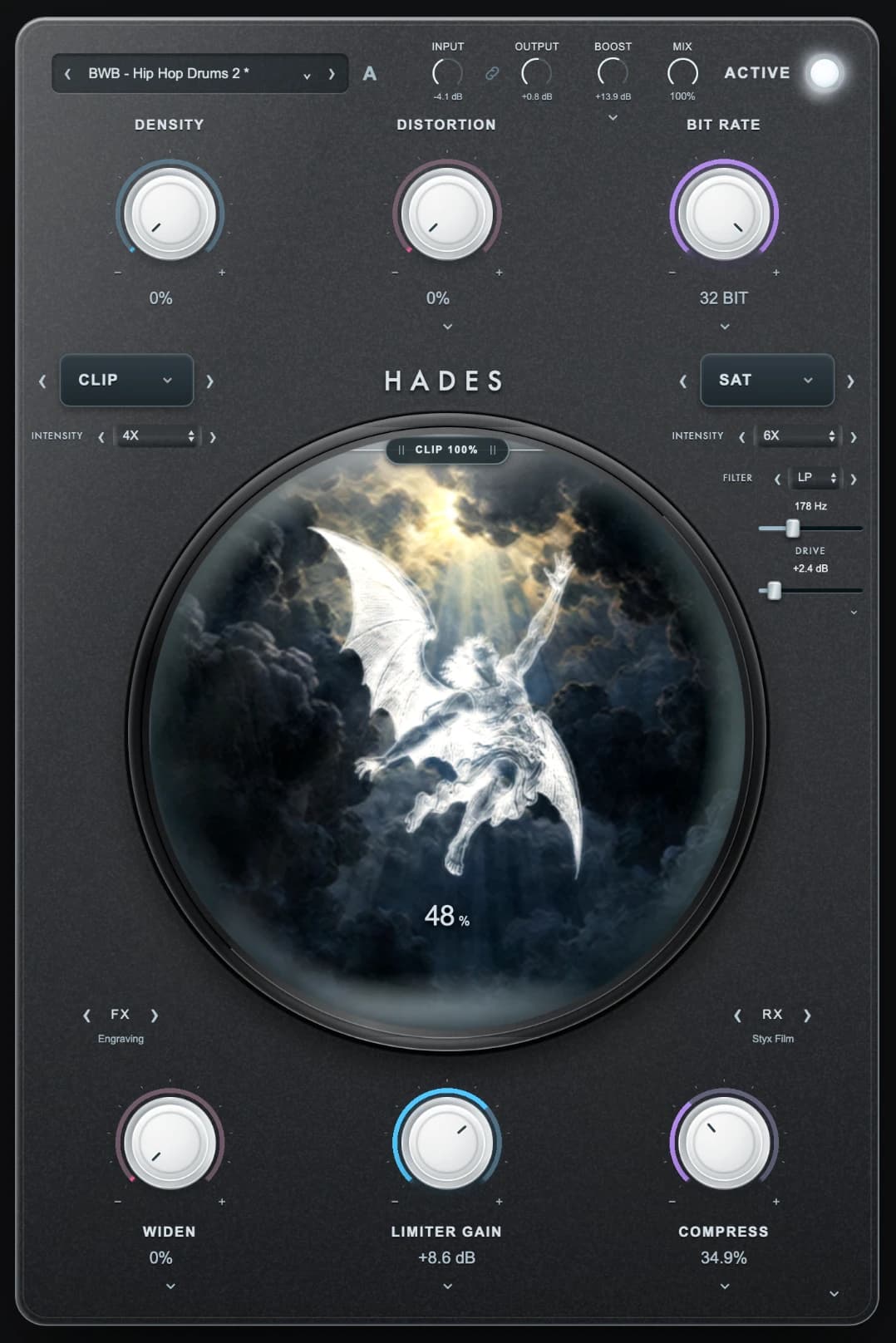
HADES plugin with a silver character descending through a storm
Take the descent
SATURATECLIPDISTORTRESHAPE
HADES heaven artworkHADES underworld artwork

Clean is only the starting point

Too clean.
Put some dirt on it.

Add weight. Scrape the edges. Find the character your beat was missing.

HEAVENHADES

Turn it. Watch it descend.

The sound changes.
So does the world.

HADES interface: Heaven, Saturation Mix at 0%

A visual tour of HADES

Heaven

The starting point. Light, gold and open sky.

Actual interface screenshots. Saturation Mix controls the descent in your DAW.

808s. Drums. Samples.

Good sounds.
Bad intentions.

HADES Distortion macro
01

808s with teeth.

Add harmonics. Give the low end a darker edge.

Saturation · Distortion · Boost
HADES Clip selector and intensity control
02

Drums with a mean streak.

Clip the peaks. Push the density. Keep the bounce.

Clip · Density · Compress
HADES Bit Rate macro at 32 bit
03

Samples with a past.

Crush the resolution. Leave a little damage.

Bit Rate · Sample Rate · Filter Drive

Drive has more than one mood

Find your kind
of wrong.

103 saturation profiles. 65 filter-drive styles. From rounded heat to ragged, fractured grit.

Play it safe.Go to 20X.Saturation + clipping intensity
Find it in your own session
HADES advanced filter with drive style, amount and Analog switch
PICK THE CHARACTER. CONTROL THE DAMAGE.
HADES Signal Path with movable Boost, Saturation Color and processing modules
YOUR MODULES. YOUR ORDER.

Break out of the default chain

One fixed path.
Your way through.

Rearrange 23 modules. Boost after distortion. Drive into the filter. Save the paths you like.

  1. BOOST
  2. DISTORT
  3. FILTER

Processing after a limiter can raise the final output.

Dial in every stage

Push it in.
Balance it out.

Independent Input and Output for each sound section. Link a pair for opposite gain moves. Keep the character under your hands.

One expandable I/O chain. No crowded front panel.

HADES Module I/O with independent Input, Output and inverse gain links
MORE DRIVE IN. YOUR LEVEL OUT.

Reckless sound. Hands-on control.

Go further.
Stay in control.

Auto headroom A beside the preset selector and Input knob

Leave room to push.

Click A for input headroom. Lock it while you explore presets.

HADES Input and Output knobs with their gain link

Drive in. Balance out.

Link Input and Output for opposite gain moves.

Gold HADES character inside the atmospheric center artwork

Let the artwork react.

Grain, interference, warping. FX moves. RX follows the audio.

HADES Widen macro and advanced disclosure

Give it another dimension.

Width, depth and Dimension. Bass width and mono controls stay close.

Look inside Width, Depth and Dimension +HADES width, bass width, mono compatibility, 3D Depth and Dimension controls
HADES underworld artwork

“I already have a saturator.”

Then you know
what dirt can do.

Now put the clipper, distortion, resolution, filter drive and signal chain under the same roof.

Take it to your own session
Full HADES interface in its darker underworld state

The entrance to the underworld

Your next beat
could use a bad influence.

HADES full interface with gold character in heaven

80+ factory presets · Movable signal chain
Mac AU + VST3 · Apple Silicon + Intel

Intro offer

$99 $49

Own HADES with one payment.

Card required. Eligible first-time users: $0 today, then one $49 payment after 7 days. Cancel during the trial to avoid the charge. Permanent ownership after payment. No ongoing subscription.

Saturation, clipping, distortion + filter drive

Bit reduction, compression, width + limiting

Module I/O + custom signal paths

Included for Black Box Bundle owners.

Already own it? Sign in

Before you descend

The last
few questions.

HADES with gold character and blue Styx atmosphere
How do I update HADES?+

Open Settings in HADES and click Check for updates. The plugin compares its installed version with the available release for your platform. If an update is ready, Get update opens your account download. Close your DAW before running the installer. You can also update through the Busy Works Beats Download Manager.

Is this just another distortion plugin?+

HADES puts saturation, clipping, distortion, bit and sample-rate reduction, compression, width, targeted Boost and limiting in one workflow. The independent blends and editable signal path give you different ways to build character.

Does everything have to sound destroyed?+

No. Start at 1X, bring the mix up a little, and compare. Separate input and output controls help you judge the character without relying on a louder signal. The higher intensities are there when you want to go further.

What does the free trial include?+

Eligible first-time users get seven days of HADES access after adding a card at checkout. Cancel during the trial to avoid the charge. Otherwise, one $49 payment gives you permanent ownership and billing stops automatically. Previous trial users may be directed to purchase.

Do Black Box Bundle owners get HADES?+

Yes. HADES is included for eligible Black Box Bundle owners. Sign in with the email tied to your bundle, then download it from your account or the Busy Works Beats Download Manager.

What can I run it on?+

The current release is for Mac, with AU and VST3 for Apple Silicon and Intel. Use it inside a compatible DAW. A Windows installer is not available yet.

How do I install and activate it?+

Download the Mac installer from your account or Download Manager. Close your DAW, install HADES, then reopen and rescan if needed. Open HADES and use Activate License to sign in with the same Busy Works Beats account that owns it or has an active trial.

Can I change the processing order?+

Yes. Open Settings, then Signal Path. Reorder the available modules, including Boost, HADES Saturation Color, Filter Drive and Main Limiter. Module I/O gives each sound section its own input, output and inverse gain link.